Place third-party badges inside the product image corners
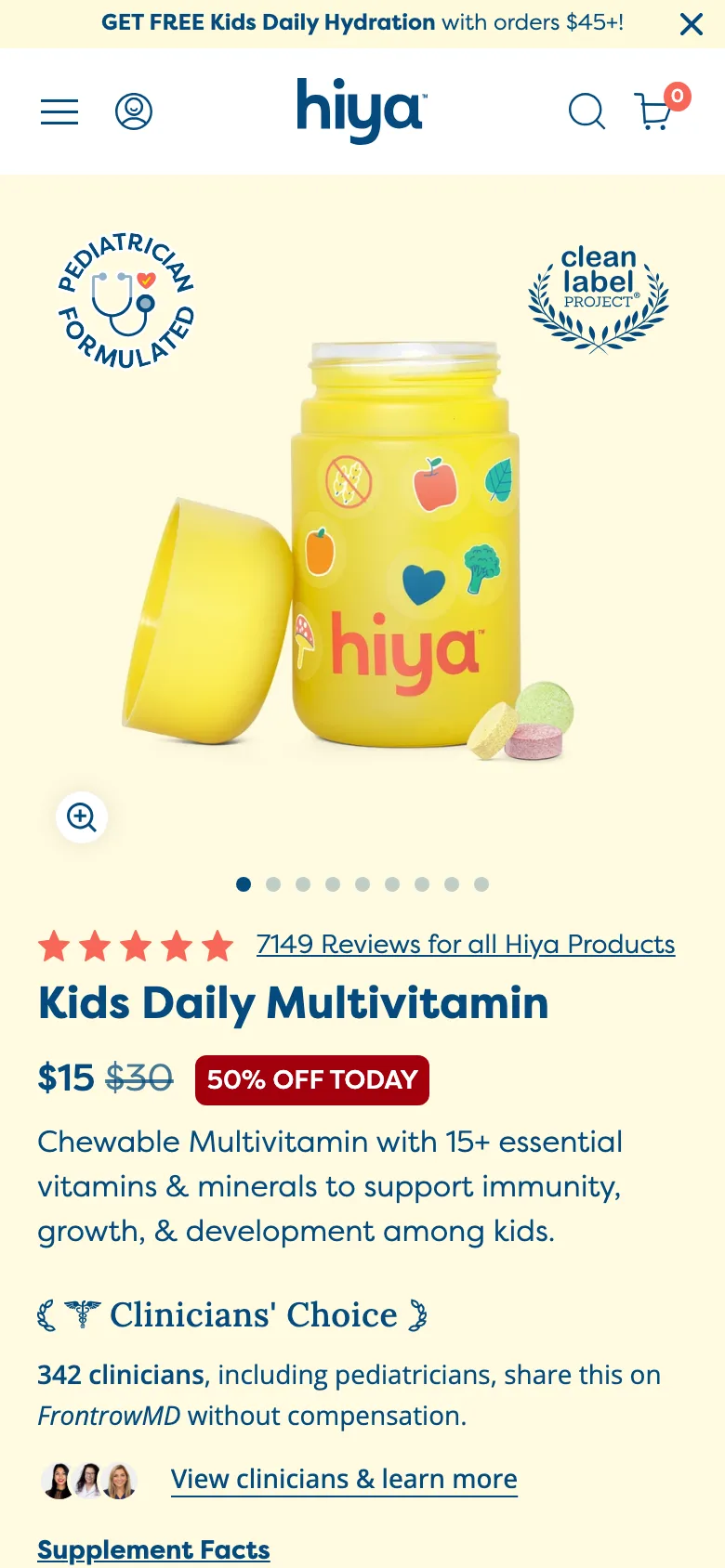
"Pediatrician Formulated" and "Clean Label Project" seals sit inside the hero image corners, so the credentials are seen with the product, not below it.
What it is
Two circular seals, "Pediatrician Formulated" and a Clean Label Project award, sit inside the top corners of the first gallery image. Below, the rating links to the review count, the price row pairs the price, a struck compare price and a "50% OFF TODAY" chip, and a "Clinicians' Choice" line gives the number of clinicians who share the product.
Why it works
On mobile the first image is often the only thing seen before a decision to scroll. Putting real third-party seals inside it means the credentials are seen in the same glance as the product. A recognised seal outperforms a drawn trust icon because the shopper did not have to take the brand's word for it.
How to test it
- Hypothesis
- Placing third-party credential seals inside the first gallery image will lift mobile add-to-cart rate versus showing them in a section below.
- Primary metric
- Add-to-cart rate (mobile product page sessions)
- Guardrail metric
- Gallery swipe rate, to confirm badges do not obscure the product
Related ideas
Want this tested on your store?
We run the experiment, call the result honestly, and get paid on what it adds.
See the performance program